Event Poster Series System: One Look, Many Dates
Build a reusable poster system for a recurring event so every date's poster looks like part of the same series, not a fresh design.
Customize this prompt
Fill in the fields below — the prompt text updates automatically. [BRACKETED] words are placeholders you replace.
The prompt
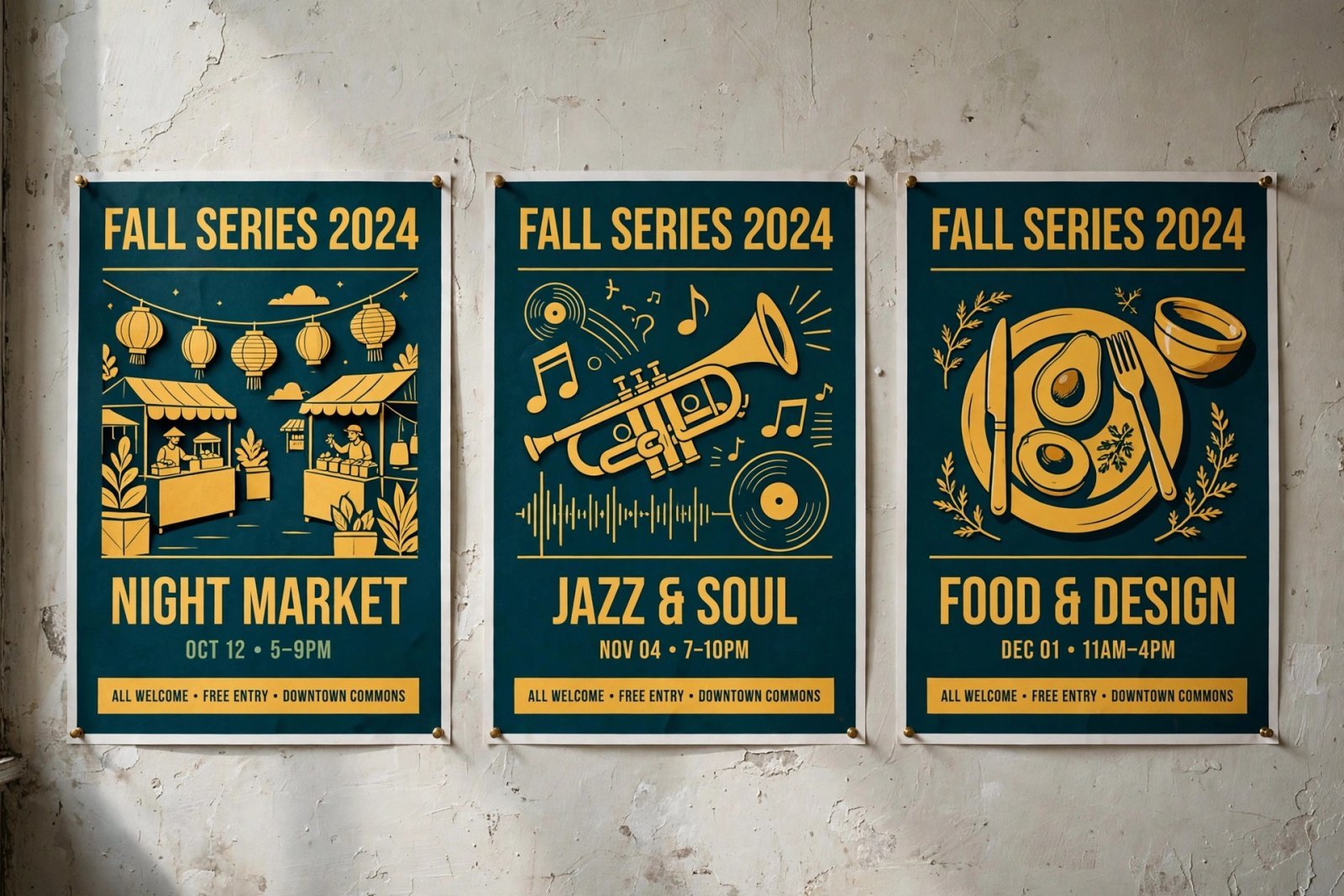
Design a reusable poster system for a recurring event: [EVENT_NAME], a [EVENT_TYPE] held [FREQUENCY] at [VENUE]. The system: a fixed grid with [HEADER_LAYOUT], a hero artwork zone showing [HERO_ARTWORK_STYLE], a locked title treatment in [TITLE_FONT_STYLE] at [TITLE_SIZE_RELATIVE], a date block that swaps cleanly, and a footer strip with [FOOTER_INFO]. Palette: [COLOR_ONE], [COLOR_TWO], [ACCENT_COLOR]. Texture: [TEXTURE]. Create three sample posters from the system: [DATE_ONE] with [THEME_ONE], [DATE_TWO] with [THEME_TWO], [DATE_THREE] with [THEME_THREE]. Each poster keeps the same grid, fonts, palette, and footer; only the hero artwork, theme line, and date change. Mood: [MOOD]. Deliver the three posters plus a one-paragraph system guide explaining what stays fixed and what swaps.
How to use it
- Define the event, venue, and frequency.
- Lock the grid, fonts, palette, and footer strip.
- Generate poster one and approve the system.
- Generate posters two and three with only theme and date swapped.
- Write the one-paragraph system guide.
- Check all three posters side by side for consistency.
Customization tips
Swap the event, venue, palette, and themes; keep the grid, fonts, and footer fixed across all posters.
Example use case
Event organizers and designers running recurring nights, markets, or shows.
Frequently asked questions
What should never change between posters?
Grid, fonts, palette, logo placement, and footer strip. Those fixed parts are what make it a series.
Can the hero artwork change a lot?
Yes, within the same style and the same artwork zone, so each poster still feels like family.
Share
Tags: poster system event design series layout typography templates graphic design
Reviewed by the PromptVault editorial team on October 18, 2026.
Source notes: Daily pipeline 20261018 batch 5